
Philips DreamMapper app for DreamStation
Track and share your sleep therapy progress


Take charge of your sleep therapy
Sleep apnoea therapy can help you reap the benefits of a good night’s sleep and be more active during the day, but sticking to therapy can be hard. The DreamMapper sleep therapy app1 can help you stay motivated. DreamMapper is a highly rated sleep therapy patient app enjoyed by users with an average rating of over 4.5 stars 2.

Keeps you informed about your mask fit and therapy hours Keeps you connected to your provider by sending recorded data directly to your care team Easy goal-setting to track your progress and stay committed Education at your fingertips with videos and guides to learn more about sleep apnoea and get the most out of your equipment

Have an account?
New to DreamMapper?
It’s easy to get started
Step 2: Follow the prompts in the DreamMapper app to pair your DreamStation device. Step 3: Allow your therapy provider to remotely view your therapy progress by supplying them your registered email address, DreamStation device serial number and selecting to consent in the DreamMapper app.
Step 1: Download the DreamMapper app and register your account.
Things you can do

Get feedback on your therapy progress every day DreamMapper lets you know how your night’s sleep went and how your therapy is progressing. It will also tell you if you’re not reaching your goals, and offers suggestions to get you back on track.

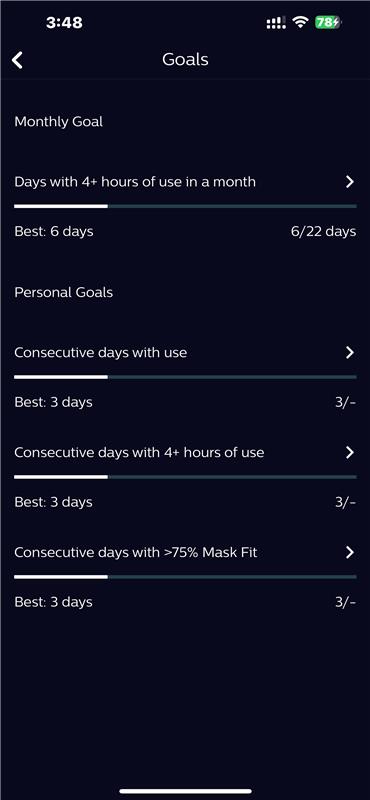
Set custom goals you can track To help you stay motivated, you can use pre-set goals or create custom goals to give you something to work toward. DreamMapper will automatically track your progress and reward you when you’ve hit your goals.

Get advice and reminders On-demand educational videos and materials help you get used to new devices and masks, and give you easy access to tips on maintaining your equipment.
You can also create reminders for when it’s time to clean or replace your equipment.
Want to stay updated on DreamStation 4G cellular modem availability and stockists? Register your interest here >
Frequently asked questions
To learn more about DreamMapper visit www.philips.com.th/dreammapper For technical support email [email protected] or [email protected] or call Philips Hotline -1800-999-119 (Operating hours: 9am to 6pm GMT+8
References For informational purposes only, not to replace physician's directions.
